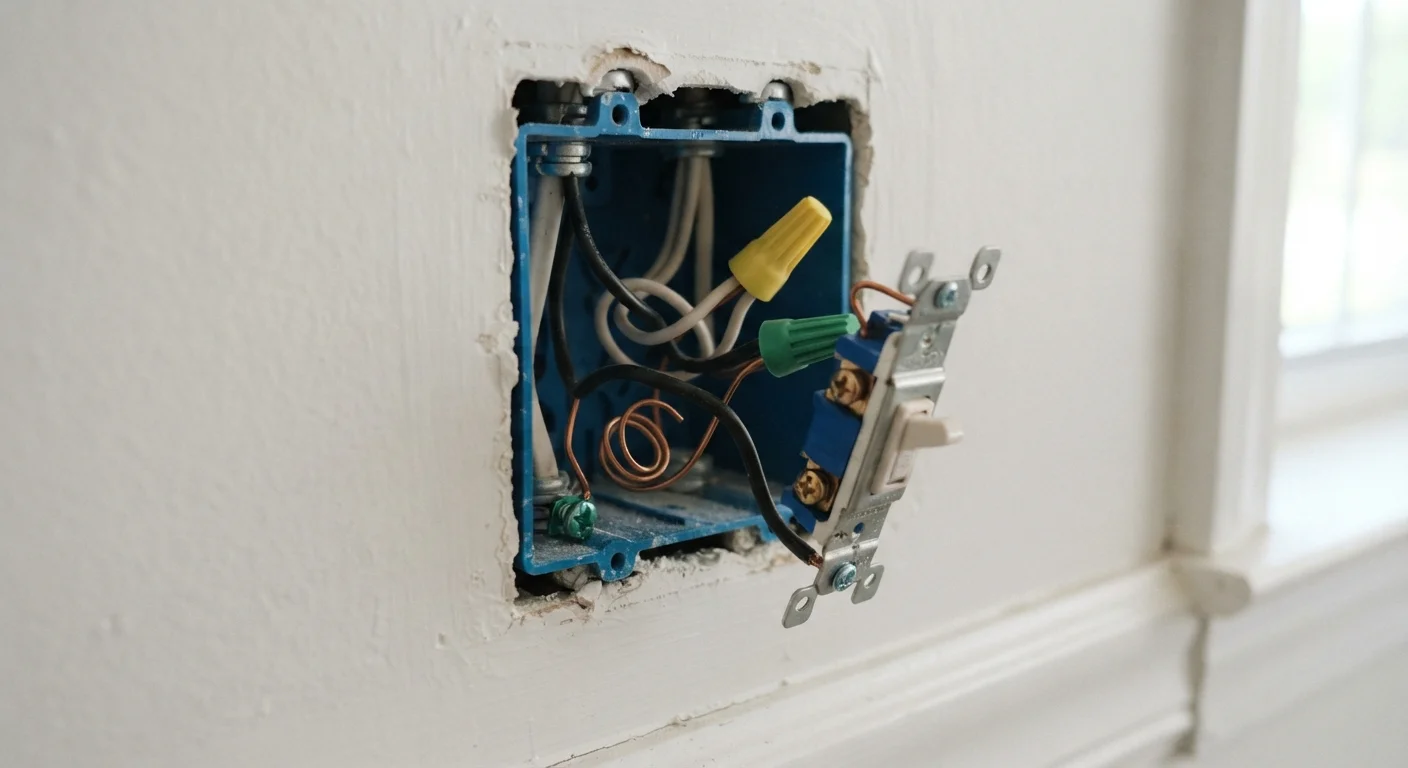
Why Wiring Is the First Thing to Check
Smart switches look like a simple upgrade — swap the old switch, connect an app, and you're done. The reality is more nuanced, and the difference often comes down to a single wire you may or may not have: the neutral wire.
In a standard modern circuit, electricity flows from the panel to the switch on the hot (black) wire, continues to the light fixture, and returns to the panel on the neutral (white) wire. Smart switches use that return path to power their own internal electronics — the Wi-Fi chip, the indicator light, the touch sensor — even when the light itself is off.
Older homes, particularly those wired before the 1980s, were often built with a "switch loop" configuration. In a switch loop, only the hot wire runs to the switch box. The neutral bypasses the switch entirely and goes straight to the fixture. That means the neutral wire is physically absent from the switch box — and most smart switches won't work without it.
Before assuming your walls are compatible, take a moment to understand what you're actually dealing with. If you're new to thinking about home automation more broadly, the practical overview of smart home devices is a useful starting point.
Common Mistakes Homeowners Make With Smart Switch Installations
These are the errors that lead to returned products, failed installs, and — in some cases — tripped breakers or damaged fixtures.
Buying a smart switch before opening the switch box to check for a neutral wire.
Why it happens: Product listings rarely mention wiring requirements prominently, and many buyers assume all modern switches are interchangeable.
Assuming all smart switches in the same product line have identical wiring requirements.
Why it happens: Manufacturers sometimes offer both neutral and no-neutral versions of the same switch, and the packaging can look nearly identical.
Installing a no-neutral smart switch without verifying LED bulb compatibility first.
Why it happens: No-neutral switches rely on current leakage through the bulb, and modern LEDs draw so little power that many cause the switch to flicker or fail entirely.
Ignoring the ground wire requirement and leaving it disconnected.
Why it happens: Older DIY resources sometimes omit grounding steps, and some homeowners treat the ground wire as optional since the switch appears to function without it.
Purchasing a smart switch without checking whether it supports the wireless protocol your hub or ecosystem uses.
Why it happens: Wi-Fi smart switches don't require a hub and are simpler to set up, but not all smart switches are Wi-Fi — some use Zigbee or Z-Wave, which need a compatible hub to function.
Getting the wiring right is foundational, but it's not the only variable. The wireless protocol your switch uses will determine whether it plays nicely with the rest of your smart home. For a clear breakdown of how protocols like Z-Wave, Zigbee, and Wi-Fi differ, see the wireless protocols guide.
Protocol Mismatch Can Make a Switch Useless
A Zigbee smart switch purchased for a Wi-Fi-only setup will not function as a smart switch at all without a compatible hub. Check your existing ecosystem — and your router's network congestion — before buying. A crowded 2.4 GHz band can also cause smart switches to drop offline regularly. See how mesh Wi-Fi supports smart home reliability for context.
What to Do If You Don't Have a Neutral Wire
You have two realistic paths forward if your switch box lacks a neutral wire.
Option 1: No-neutral smart switches. Some smart switches are engineered to operate on a "hot only" circuit by using a tiny trickle of current through the light bulb itself to stay powered. These work — but with caveats. They can cause flickering with LED bulbs, may require specific bulb types, and often don't support dimming reliably. Always verify bulb compatibility before purchasing.
Option 2: Run a new neutral wire. An electrician can often pull a neutral wire through the existing conduit or cable to your switch box. This is the cleanest long-term solution and opens up the full range of smart switch options. It's also the safer route — working inside a panel or adding wiring is regulated work in most jurisdictions and should not be a DIY project.
Don't Work on Live Wires — Ever
Always switch off the circuit breaker controlling the switch before opening any wall box. Use a non-contact voltage tester to confirm power is off before touching any wires. If you're uncertain which breaker controls the circuit, or if your panel is unlabeled, stop and call a licensed electrician. Electrical mistakes can cause fires, serious injury, or death.
Once your wiring situation is resolved, you can think about the bigger picture. The smart home setup walkthrough and the device compatibility checklist are logical next steps.